565 lines
24 KiB
Markdown
565 lines
24 KiB
Markdown

|
---
|
|||
|
|
cover: "https://image.luming.cool/i/2026/05/10/69fff354c9b08.webp"
|
|||
|
|
title: "记一次开发:田字格生成器"
|
|||
|
|
pubDate: "2025-07-13T10:20:00.000Z"
|
|||
|
|
updatedDate: "2025-07-13T10:20:00.000Z"
|
|||
|
|
categories:
|
|||
|
|
- "科技"
|
|||
|
|
tags:
|
|||
|
|
- "开发"
|
|||
|
|
- "生活"
|
|||
|
|
- "软件"
|
|||
|
|
comments: true
|
|||
|
|
---
|
|||
|
|
|
|||
|
|
## 前言
|
|||
|
|
|
|||
|
|
朋友们,上午好。今天我想和大家分享一下我近期与 AI 协作,使用 Python+Flask 进行开发的经历。
|
|||
|
|
|
|||
|
|
本次开发的软件名字叫“田字格生成器”,已经部署上线,可以点击[这里](https://tzg.rsv.ee/)使用。
|
|||
|
|
|
|||
|
|
## 立项原因
|
|||
|
|
|
|||
|
|
家母最近参与了洛阳日报社的托管班暑期托管活动,担任硬笔书法教师。这是她第一次在正式的单位进行授课,没有教材,需要她自己准备。
|
|||
|
|
|
|||
|
|
我并不知道母亲是怎么准备教材的。前几天的下午, 我在衔接班的空隙,看到母亲用尺子在一张纸上画着什么。走近一看,霍!纸上打印的是她用手机拍下来的范字,糊成了保密级画质。而她拿着尺子,是为了手动将模糊的田字格虚线描实。
|
|||
|
|
|
|||
|
|
而目光一转,她旁边还有一摞跟教辅一样厚的原始稿件等待处理,这得处理到猴年马月!于是我毫不犹豫地对她说:“交给我吧!”
|
|||
|
|
|
|||
|
|
就这样,一个名为“田字格批量生成器”的文件夹就被新建了。
|
|||
|
|
|
|||
|
|
## 需求确定
|
|||
|
|
|
|||
|
|
母亲的要求有很多,比如:
|
|||
|
|
|
|||
|
|
1. 一页A4纸,放一个田字格,撑满整张纸,贴到黑板上给学生讲;
|
|||
|
|
2. 一页A4纸,放一个学生的名字,横版,撑满整张纸,用来教学生写自己的名字;
|
|||
|
|
3. 一页A4纸,放一张字帖;
|
|||
|
|
4. 一页A4纸,放一页竖版的字帖;
|
|||
|
|
5. 一页A4纸,放30个字,用作自己练习,6行5列。
|
|||
|
|
|
|||
|
|
而网上的田字格在线生成器并不能满足母亲的需求,所以,Cursor,启动!
|
|||
|
|
|
|||
|
|
## 基础功能
|
|||
|
|
|
|||
|
|
我先将需求投喂给 Cursor,接着,它帮我写出了如下界面的程序:
|
|||
|
|
|
|||
|
|
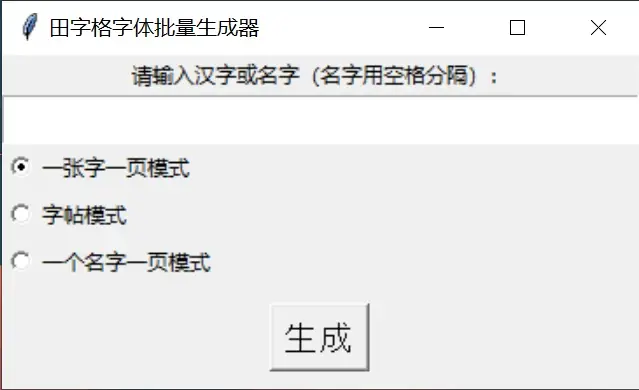初版程序
|
|||
|
|
|
|||
|
|
主要功能:用户往编辑框里输入需要生成的汉字→选择模式→程序根据对应的模式生成 PDF 文件并输出到 output 目录下。
|
|||
|
|
|
|||
|
|
当我把生成好的 PDF 拿给母亲看的时候,她果断地摇了摇头:
|
|||
|
|
|
|||
|
|
> 你这个字体面积占整个田字格面积的占比太小了。
|
|||
|
|
>
|
|||
|
|
> 你刚才给我看的那个字帖生成网页,那个网页的田字格我觉得符合我的需求。
|
|||
|
|
|
|||
|
|
于是我便把网络上的田字格字帖生成器打开了,母亲仔细看了看,认可地点点头,要求我按照它一样做。
|
|||
|
|
|
|||
|
|
为此,我将那个田字格生成器作为 HTML 保存了下来,并放到了项目根目录,和 Cursor 说:
|
|||
|
|
|
|||
|
|
> 模仿 xxxxxx.html 的田字格排版形式,重新排版现有的田字格。
|
|||
|
|
|
|||
|
|
等到 AI 生成完毕,我再次测试让母亲看,这次她终于接受了。
|
|||
|
|
|
|||
|
|
## 网页版改编&上线
|
|||
|
|
|
|||
|
|
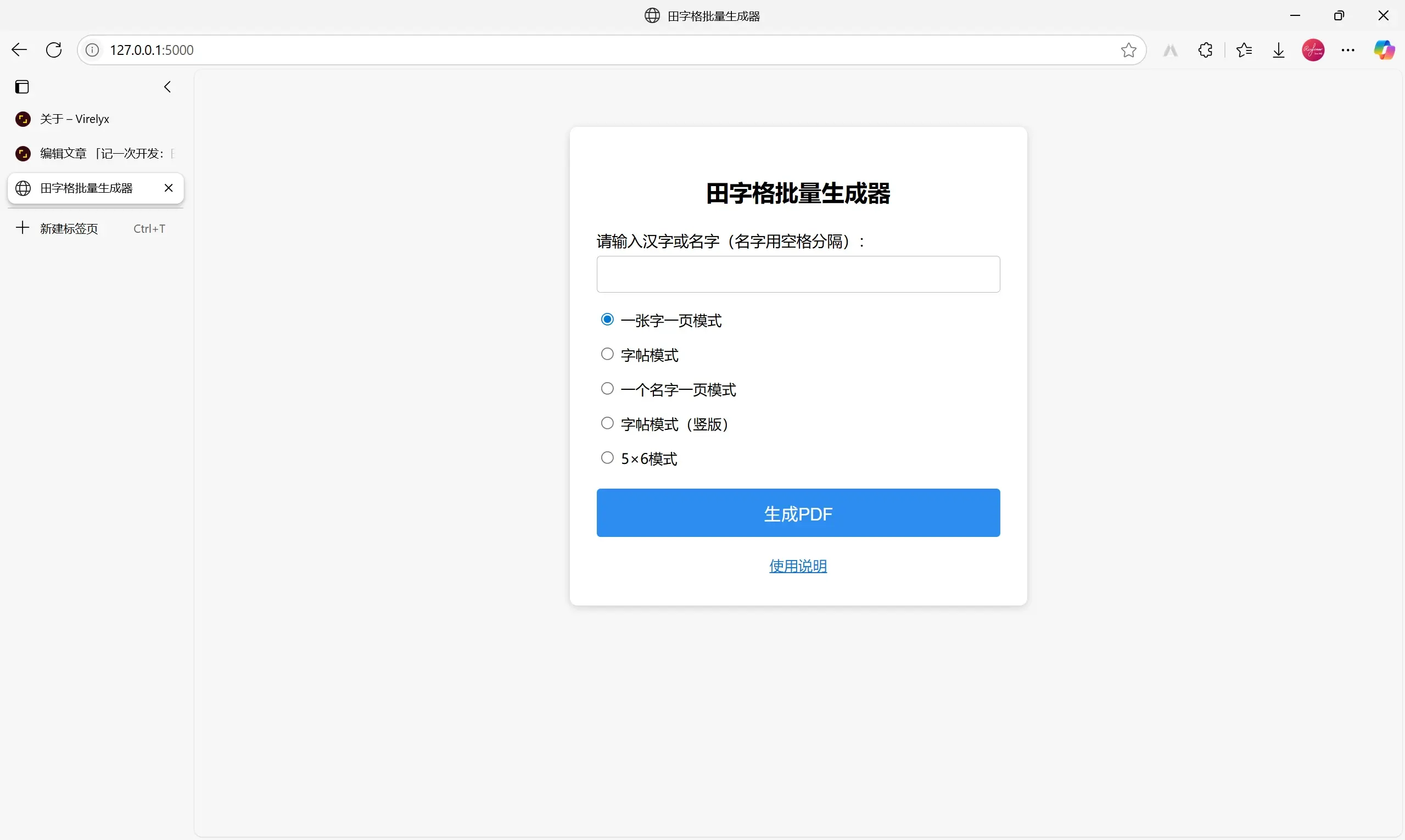
既然母亲已经接受了 AI 生成的田字格样式,那么怎么排版就是我的事情了。在向 AI 投喂了一大堆提示词之后,终于生成了以下样式的田字格生成器:
|
|||
|
|
|
|||
|
|
|
|||
|
|
|
|||
|
|
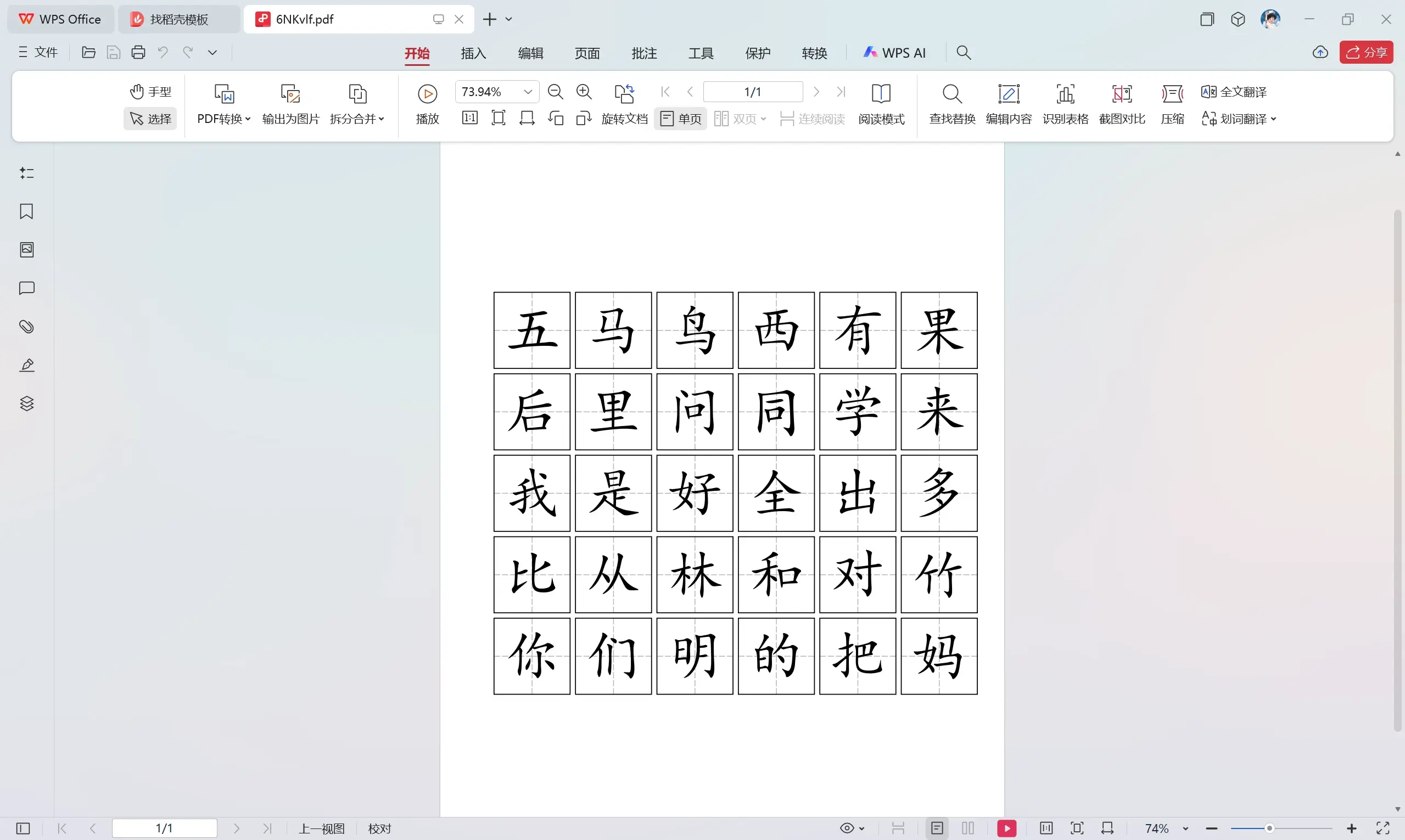
期间还有一个小插曲:我在让 AI 编写出 6 行 5 列的排版时,错将“6 行 5 列”表达成了“5 行 6 列”,AI 生成了以下样式的排版:
|
|||
|
|
|
|||
|
|
|
|||
|
|
|
|||
|
|
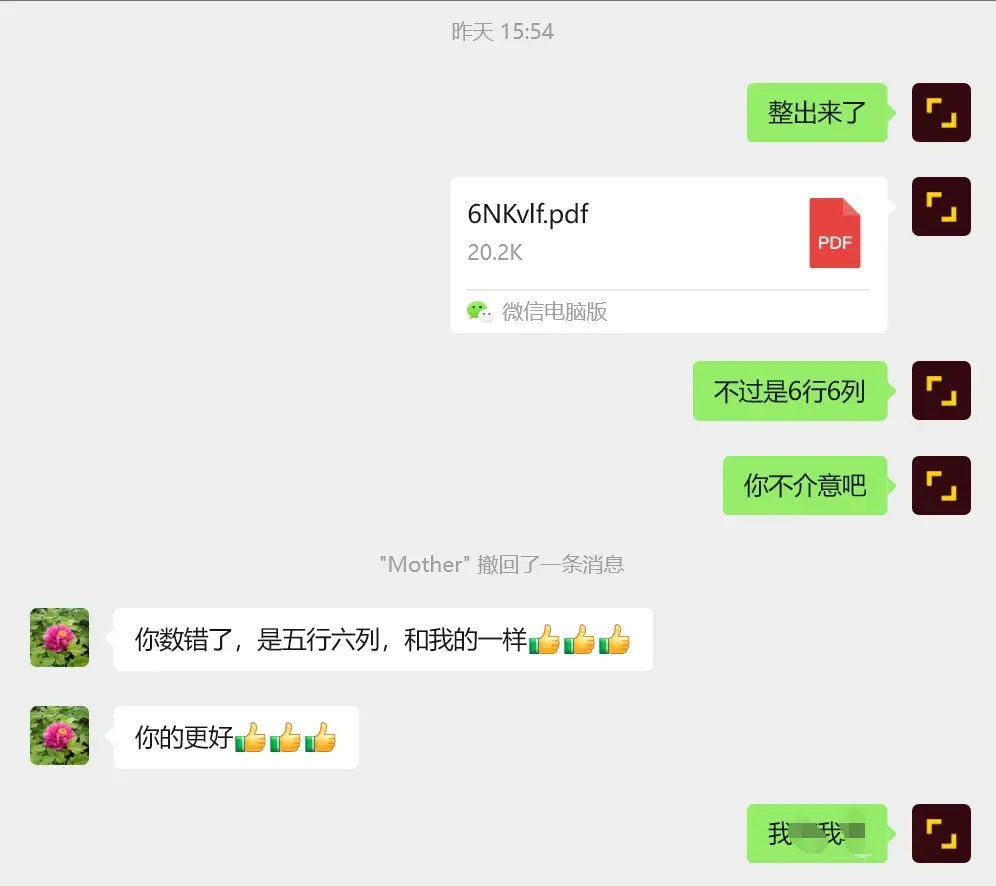
由于这整体看起来太像是正方形了,所以我把它错看成了 6 行 6 列。于是我竭尽全力地让 AI “纠正”,却无济于事。我笑骂了 AI 几句,便想着放弃,关闭了 Cursor。
|
|||
|
|
|
|||
|
|
当我把这份废稿发给母亲的时候,母亲的一句话点醒了我——是我数错了:
|
|||
|
|
|
|||
|
|
|
|||
|
|
|
|||
|
|
得知这个消息的我兴奋极了,连忙再次打开 Cursor,输入提示词,等待改编完毕,运行,生成,成功了!
|
|||
|
|
|
|||
|
|
## 源代码
|
|||
|
|
|
|||
|
|
因为我的 Github 账号的 2FA 验证器被我卸载了,同时,恢复密钥也被我误删了,所以我的 Github 账号(Rise-forever)现在完全用不了了。
|
|||
|
|
|
|||
|
|
这个程序就先在这里开源吧,后续我可能会在 [CNB](https://cnb.cool) 上开源。
|
|||
|
|
|
|||
|
|
以下是主程序(.py)的源码,命名为 app.py:
|
|||
|
|
|
|||
|
|
```
|
|||
|
|
from flask import Flask, render_template, request, send_file, redirect, url_for, flash
|
|||
|
|
import os
|
|||
|
|
import io
|
|||
|
|
import random
|
|||
|
|
import string
|
|||
|
|
from reportlab.pdfgen import canvas
|
|||
|
|
from reportlab.lib.pagesizes import A4
|
|||
|
|
from reportlab.pdfbase import pdfmetrics
|
|||
|
|
from reportlab.pdfbase.ttfonts import TTFont
|
|||
|
|
from werkzeug.utils import secure_filename
|
|||
|
|
|
|||
|
|
app = Flask(__name__)
|
|||
|
|
app.secret_key = 'tianzige_secret_key'
|
|||
|
|
|
|||
|
|
# 注册楷体字体(确保simkai.ttf在同目录下)
|
|||
|
|
pdfmetrics.registerFont(TTFont('KaiTi', 'simkai.ttf'))
|
|||
|
|
|
|||
|
|
def random_str(length=6):
|
|||
|
|
return ''.join(random.choices(string.ascii_letters + string.digits, k=length))
|
|||
|
|
|
|||
|
|
def draw_tianzige(c, x, y, size, border_width: float = 2.0, dash_width: float = 1.0, dash_color=(0,0,0), mode=None):
|
|||
|
|
cx = x + size/2
|
|||
|
|
cy = y + size/2
|
|||
|
|
if mode == 'zitieborder':
|
|||
|
|
c.setLineWidth(dash_width)
|
|||
|
|
c.setStrokeColorRGB(*dash_color)
|
|||
|
|
segs = 5
|
|||
|
|
gap_ratio = 0.3
|
|||
|
|
for i in range(segs):
|
|||
|
|
seg_len = (size/2) / (segs + (segs-1)*gap_ratio)
|
|||
|
|
gap = seg_len * gap_ratio
|
|||
|
|
y1 = cy + i * (seg_len + gap)
|
|||
|
|
y2 = y1 + seg_len
|
|||
|
|
if y2 <= y + size:
|
|||
|
|
c.line(cx, y1, cx, y2)
|
|||
|
|
for i in range(segs):
|
|||
|
|
seg_len = (size/2) / (segs + (segs-1)*gap_ratio)
|
|||
|
|
gap = seg_len * gap_ratio
|
|||
|
|
y1 = cy - i * (seg_len + gap)
|
|||
|
|
y2 = y1 - seg_len
|
|||
|
|
if y2 >= y:
|
|||
|
|
c.line(cx, y1, cx, y2)
|
|||
|
|
for i in range(segs):
|
|||
|
|
seg_len = (size/2) / (segs + (segs-1)*gap_ratio)
|
|||
|
|
gap = seg_len * gap_ratio
|
|||
|
|
x1 = cx - i * (seg_len + gap)
|
|||
|
|
x2 = x1 - seg_len
|
|||
|
|
if x2 >= x:
|
|||
|
|
c.line(x1, cy, x2, cy)
|
|||
|
|
for i in range(segs):
|
|||
|
|
seg_len = (size/2) / (segs + (segs-1)*gap_ratio)
|
|||
|
|
gap = seg_len * gap_ratio
|
|||
|
|
x1 = cx + i * (seg_len + gap)
|
|||
|
|
x2 = x1 + seg_len
|
|||
|
|
if x2 <= x + size:
|
|||
|
|
c.line(x1, cy, x2, cy)
|
|||
|
|
c.setLineWidth(border_width)
|
|||
|
|
c.setStrokeColorRGB(0,0,0)
|
|||
|
|
c.rect(x, y, size, size)
|
|||
|
|
return
|
|||
|
|
dash = [8, 5]
|
|||
|
|
c.setLineWidth(dash_width)
|
|||
|
|
c.setStrokeColorRGB(*dash_color)
|
|||
|
|
for i in range(10):
|
|||
|
|
y1 = y + i * size / 10
|
|||
|
|
y2 = y + (i + 1) * size / 10
|
|||
|
|
c.setDash(dash)
|
|||
|
|
c.line(x + size/2, y1, x + size/2, y2)
|
|||
|
|
for i in range(10):
|
|||
|
|
x1 = x + i * size / 10
|
|||
|
|
x2 = x + (i + 1) * size / 10
|
|||
|
|
c.setDash(dash)
|
|||
|
|
c.line(x1, y + size/2, x2, y + size/2)
|
|||
|
|
c.setDash([])
|
|||
|
|
c.setLineWidth(border_width)
|
|||
|
|
c.setStrokeColorRGB(0,0,0)
|
|||
|
|
c.rect(x, y, size, size)
|
|||
|
|
|
|||
|
|
def generate_single_page(chars):
|
|||
|
|
buffer = io.BytesIO()
|
|||
|
|
c = canvas.Canvas(buffer, pagesize=A4)
|
|||
|
|
width, height = A4
|
|||
|
|
margin = 20
|
|||
|
|
size = min(width, height) - 2 * margin
|
|||
|
|
x = (width - size) / 2
|
|||
|
|
y = (height - size) / 2
|
|||
|
|
font_size = int(size * 0.725)
|
|||
|
|
for char in chars:
|
|||
|
|
draw_tianzige(c, x, y, size, border_width=4.0, dash_width=3.0, dash_color=(0.2,0.2,0.2))
|
|||
|
|
c.setFont("KaiTi", font_size)
|
|||
|
|
c.setFillColorRGB(0, 0, 0)
|
|||
|
|
c.drawCentredString(width/2, height/2 - size*0.25, char)
|
|||
|
|
c.showPage()
|
|||
|
|
c.save()
|
|||
|
|
buffer.seek(0)
|
|||
|
|
return buffer
|
|||
|
|
|
|||
|
|
def generate_zi_tie(chars):
|
|||
|
|
buffer = io.BytesIO()
|
|||
|
|
c = canvas.Canvas(buffer, pagesize=A4)
|
|||
|
|
width, height = A4
|
|||
|
|
mm = 2.8346
|
|||
|
|
grid_size = 15 * mm
|
|||
|
|
gap = 2 * mm
|
|||
|
|
cols = 12
|
|||
|
|
rows = 15
|
|||
|
|
total_grid_h = rows * grid_size + (rows - 1) * gap
|
|||
|
|
total_grid_w = cols * grid_size
|
|||
|
|
margin_x = max((width - total_grid_w) / 2, 0)
|
|||
|
|
margin_y = max((height - total_grid_h) / 2, 0)
|
|||
|
|
font_size = int(grid_size * 0.725)
|
|||
|
|
chars = list(chars)
|
|||
|
|
page_count = (len(chars) + rows - 1) // rows
|
|||
|
|
char_idx = 0
|
|||
|
|
for page in range(page_count):
|
|||
|
|
for row in range(rows):
|
|||
|
|
if char_idx >= len(chars):
|
|||
|
|
break
|
|||
|
|
char = chars[char_idx]
|
|||
|
|
for col in range(cols):
|
|||
|
|
gx = margin_x + col * grid_size
|
|||
|
|
gy = height - margin_y - (row + 1) * grid_size - row * gap
|
|||
|
|
draw_tianzige(c, gx, gy, grid_size, border_width=0.8, dash_width=0.5, dash_color=(0.69,0.69,0.69), mode='zitieborder')
|
|||
|
|
if col == 0:
|
|||
|
|
c.setFont("KaiTi", font_size)
|
|||
|
|
c.setFillColorRGB(0, 0, 0)
|
|||
|
|
c.drawCentredString(gx + grid_size/2, gy + grid_size/2 - grid_size*0.25, char)
|
|||
|
|
char_idx += 1
|
|||
|
|
c.showPage()
|
|||
|
|
c.save()
|
|||
|
|
buffer.seek(0)
|
|||
|
|
return buffer
|
|||
|
|
|
|||
|
|
def generate_name_per_page(text):
|
|||
|
|
buffer = io.BytesIO()
|
|||
|
|
c = canvas.Canvas(buffer, pagesize=(842, 595))
|
|||
|
|
width, height = 842, 595
|
|||
|
|
margin = 20
|
|||
|
|
names = [n.strip() for n in text.split() if n.strip()]
|
|||
|
|
for name in names:
|
|||
|
|
n_chars = len(name)
|
|||
|
|
if n_chars == 0:
|
|||
|
|
continue
|
|||
|
|
size = min((width - 2*margin) / n_chars, height - 2*margin)
|
|||
|
|
font_size = int(size * 0.725)
|
|||
|
|
y = (height - size) / 2
|
|||
|
|
start_x = (width - size * n_chars) / 2
|
|||
|
|
for i, char in enumerate(name):
|
|||
|
|
gx = start_x + i * size
|
|||
|
|
draw_tianzige(c, gx, y, size, border_width=4.0, dash_width=3.0, dash_color=(0.2,0.2,0.2))
|
|||
|
|
c.setFont("KaiTi", font_size)
|
|||
|
|
c.setFillColorRGB(0, 0, 0)
|
|||
|
|
c.drawCentredString(gx + size/2, height/2 - size*0.25, char)
|
|||
|
|
c.showPage()
|
|||
|
|
c.save()
|
|||
|
|
buffer.seek(0)
|
|||
|
|
return buffer
|
|||
|
|
|
|||
|
|
def generate_zi_tie_vertical(chars):
|
|||
|
|
buffer = io.BytesIO()
|
|||
|
|
c = canvas.Canvas(buffer, pagesize=A4)
|
|||
|
|
width, height = A4
|
|||
|
|
mm = 2.8346
|
|||
|
|
grid_size = 15 * mm
|
|||
|
|
gap = 2 * mm
|
|||
|
|
cols = 12
|
|||
|
|
rows = 15
|
|||
|
|
total_grid_h = rows * grid_size + (rows - 1) * gap
|
|||
|
|
total_grid_w = cols * grid_size
|
|||
|
|
margin_x = max((width - total_grid_w) / 2, 0)
|
|||
|
|
margin_y = max((height - total_grid_h) / 2, 0)
|
|||
|
|
font_size = int(grid_size * 0.725)
|
|||
|
|
chars = list(chars)
|
|||
|
|
page_count = (len(chars) + cols - 1) // cols
|
|||
|
|
char_idx = 0
|
|||
|
|
for page in range(page_count):
|
|||
|
|
# 获取当前页的字符(最多12个)
|
|||
|
|
page_chars = []
|
|||
|
|
for col in range(cols):
|
|||
|
|
if char_idx < len(chars):
|
|||
|
|
page_chars.append(chars[char_idx])
|
|||
|
|
char_idx += 1
|
|||
|
|
else:
|
|||
|
|
page_chars.append('') # 空字符占位
|
|||
|
|
# 绘制当前页
|
|||
|
|
for col in range(cols):
|
|||
|
|
char = page_chars[col]
|
|||
|
|
for row in range(rows):
|
|||
|
|
gx = margin_x + col * grid_size
|
|||
|
|
gy = height - margin_y - (row + 1) * grid_size - row * gap
|
|||
|
|
draw_tianzige(c, gx, gy, grid_size, border_width=0.8, dash_width=0.5, dash_color=(0.69,0.69,0.69), mode='zitieborder')
|
|||
|
|
# 在第1、6、11行显示范字(如果该列有字符)
|
|||
|
|
if char and (row == 0 or row == 5 or row == 10):
|
|||
|
|
c.setFont("KaiTi", font_size)
|
|||
|
|
c.setFillColorRGB(0, 0, 0)
|
|||
|
|
c.drawCentredString(gx + grid_size/2, gy + grid_size/2 - grid_size*0.25, char)
|
|||
|
|
c.showPage()
|
|||
|
|
c.save()
|
|||
|
|
buffer.seek(0)
|
|||
|
|
return buffer
|
|||
|
|
|
|||
|
|
def generate_5x6_mode(chars):
|
|||
|
|
buffer = io.BytesIO()
|
|||
|
|
c = canvas.Canvas(buffer, pagesize=A4)
|
|||
|
|
width, height = A4
|
|||
|
|
mm = 2.8346
|
|||
|
|
cols = 5 # 改为5列
|
|||
|
|
rows = 6 # 改为6行
|
|||
|
|
# 计算田字格大小,让总宽度贴边A4纸宽度
|
|||
|
|
gap = 1.5 * mm # 间距
|
|||
|
|
# 计算田字格大小和边距,确保左右边距相等
|
|||
|
|
margin_x = 10 * mm # 设置左右边距
|
|||
|
|
available_width = width - 2 * margin_x
|
|||
|
|
grid_size = (available_width - (cols - 1) * gap) / cols # 计算田字格大小
|
|||
|
|
# 重新计算边距确保居中
|
|||
|
|
total_grid_width = cols * grid_size + (cols - 1) * gap
|
|||
|
|
margin_x = (width - total_grid_width) / 2 # 确保左右边距相等
|
|||
|
|
# 计算总高度和垂直边距
|
|||
|
|
total_grid_h = rows * grid_size + (rows - 1) * gap
|
|||
|
|
margin_y = max((height - total_grid_h) / 2, 15 * mm)
|
|||
|
|
font_size = int(grid_size * 0.725)
|
|||
|
|
chars = list(chars)
|
|||
|
|
page_count = (len(chars) + 29) // 30 # 每页30个格子
|
|||
|
|
char_idx = 0
|
|||
|
|
for page in range(page_count):
|
|||
|
|
# 先绘制所有田字格(6行5列)
|
|||
|
|
for row in range(rows):
|
|||
|
|
for col in range(cols):
|
|||
|
|
gx = margin_x + col * (grid_size + gap)
|
|||
|
|
gy = height - margin_y - (row + 1) * grid_size - row * gap
|
|||
|
|
# 加重框线、虚线和字体颜色
|
|||
|
|
draw_tianzige(c, gx, gy, grid_size, border_width=3.0, dash_width=2.5, dash_color=(0.2,0.2,0.2), mode='zitieborder')
|
|||
|
|
# 再填充字符(从左往右,从上往下)
|
|||
|
|
for row in range(rows):
|
|||
|
|
for col in range(cols):
|
|||
|
|
if char_idx < len(chars):
|
|||
|
|
gx = margin_x + col * (grid_size + gap)
|
|||
|
|
gy = height - margin_y - (row + 1) * grid_size - row * gap
|
|||
|
|
c.setFont("KaiTi", font_size)
|
|||
|
|
c.setFillColorRGB(0, 0, 0) # 纯黑色字体
|
|||
|
|
c.drawCentredString(gx + grid_size/2, gy + grid_size/2 - grid_size*0.25, chars[char_idx])
|
|||
|
|
char_idx += 1
|
|||
|
|
c.showPage()
|
|||
|
|
c.save()
|
|||
|
|
buffer.seek(0)
|
|||
|
|
return buffer
|
|||
|
|
|
|||
|
|
@app.route('/', methods=['GET', 'POST'])
|
|||
|
|
def index():
|
|||
|
|
if request.method == 'POST':
|
|||
|
|
chars = request.form.get('chars', '').strip()
|
|||
|
|
mode = request.form.get('mode', '1')
|
|||
|
|
if not chars:
|
|||
|
|
flash('请输入要生成的汉字或名字!')
|
|||
|
|
return redirect(url_for('index'))
|
|||
|
|
if mode == '1':
|
|||
|
|
pdf_buffer = generate_single_page(chars)
|
|||
|
|
elif mode == '2':
|
|||
|
|
pdf_buffer = generate_zi_tie(chars)
|
|||
|
|
elif mode == '3':
|
|||
|
|
pdf_buffer = generate_name_per_page(chars)
|
|||
|
|
elif mode == '4':
|
|||
|
|
pdf_buffer = generate_zi_tie_vertical(chars)
|
|||
|
|
elif mode == '5':
|
|||
|
|
pdf_buffer = generate_5x6_mode(chars)
|
|||
|
|
else:
|
|||
|
|
flash('请选择生成模式!')
|
|||
|
|
return redirect(url_for('index'))
|
|||
|
|
# 文件名:前三个字+随机串
|
|||
|
|
base = chars[:3] if len(chars) >= 3 else chars
|
|||
|
|
filename = f"{base}{random_str(6)}.pdf"
|
|||
|
|
filename = secure_filename(filename)
|
|||
|
|
return send_file(pdf_buffer, as_attachment=True, download_name=filename, mimetype='application/pdf')
|
|||
|
|
return render_template('index.html')
|
|||
|
|
|
|||
|
|
if __name__ == '__main__':
|
|||
|
|
app.run(debug=True)
|
|||
|
|
```
|
|||
|
|
|
|||
|
|
以下是 index.html 的源码,index.html 需要在主程序所在目录新建一个名为“templates”的文件夹,并将 HTML 放进去。
|
|||
|
|
|
|||
|
|
```
|
|||
|
|
<!DOCTYPE html>
|
|||
|
|
<html lang="zh-CN">
|
|||
|
|
<head>
|
|||
|
|
<meta charset="UTF-8">
|
|||
|
|
<title>田字格批量生成器</title>
|
|||
|
|
<style>
|
|||
|
|
body { font-family: '微软雅黑', Arial, sans-serif; background: #f7f7f7; }
|
|||
|
|
.container { max-width: 420px; margin: 60px auto; background: #fff; border-radius: 8px; box-shadow: 0 2px 8px #ccc; padding: 32px 28px; }
|
|||
|
|
h2 { text-align: center; margin-bottom: 24px; }
|
|||
|
|
label { display: block; margin: 16px 0 6px 0; font-size: 16px; }
|
|||
|
|
input[type="text"] { display: block; box-sizing: border-box; width: 100%; padding: 8px 10px; font-size: 18px; border: 1px solid #bbb; border-radius: 4px; margin: 0 auto; }
|
|||
|
|
.modes { margin: 18px 0 22px 0; }
|
|||
|
|
.modes label { display: block; font-size: 15px; margin-bottom: 6px; }
|
|||
|
|
button { width: 100%; background: #2d8cf0; color: #fff; border: none; border-radius: 4px; padding: 12px 0; font-size: 18px; cursor: pointer; }
|
|||
|
|
button:hover { background: #1976d2; }
|
|||
|
|
.msg { color: #d32f2f; text-align: center; margin-bottom: 10px; }
|
|||
|
|
</style>
|
|||
|
|
</head>
|
|||
|
|
<body>
|
|||
|
|
<div class="container">
|
|||
|
|
<h2>田字格批量生成器</h2>
|
|||
|
|
{% with messages = get_flashed_messages() %}
|
|||
|
|
{% if messages %}
|
|||
|
|
<div class="msg">{{ messages[0] }}</div>
|
|||
|
|
{% endif %}
|
|||
|
|
{% endwith %}
|
|||
|
|
<form method="post">
|
|||
|
|
<label for="chars">请输入汉字或名字(名字用空格分隔):</label>
|
|||
|
|
<input type="text" id="chars" name="chars" required>
|
|||
|
|
<div class="modes">
|
|||
|
|
<label><input type="radio" name="mode" value="1" checked> 一张字一页模式</label>
|
|||
|
|
<label><input type="radio" name="mode" value="2"> 字帖模式</label>
|
|||
|
|
<label><input type="radio" name="mode" value="3"> 一个名字一页模式</label>
|
|||
|
|
<label><input type="radio" name="mode" value="4"> 字帖模式(竖版)</label>
|
|||
|
|
<label><input type="radio" name="mode" value="5"> 5×6模式</label>
|
|||
|
|
</div>
|
|||
|
|
<button type="submit" id="generateBtn">生成PDF</button>
|
|||
|
|
<div style="text-align:center;margin-top:18px;">
|
|||
|
|
<a href="#" id="helpLink" style="color:#1976d2;font-size:15px;text-decoration:underline;">使用说明</a>
|
|||
|
|
</div>
|
|||
|
|
</form>
|
|||
|
|
</div>
|
|||
|
|
<script>
|
|||
|
|
// 拦截表单提交,异步生成PDF
|
|||
|
|
const form = document.querySelector('form');
|
|||
|
|
const btn = document.getElementById('generateBtn');
|
|||
|
|
form.onsubmit = async function(e) {
|
|||
|
|
e.preventDefault();
|
|||
|
|
btn.disabled = true;
|
|||
|
|
btn.textContent = '生成中...';
|
|||
|
|
const formData = new FormData(form);
|
|||
|
|
const res = await fetch('/', {
|
|||
|
|
method: 'POST',
|
|||
|
|
body: formData
|
|||
|
|
});
|
|||
|
|
if (res.ok) {
|
|||
|
|
// 生成成功,弹窗选择
|
|||
|
|
const blob = await res.blob();
|
|||
|
|
const filename = decodeURIComponent(res.headers.get('Content-Disposition').split('filename=')[1].replace(/['"]/g, ''));
|
|||
|
|
showChoiceDialog(blob, filename);
|
|||
|
|
} else {
|
|||
|
|
alert('生成失败,请重试!');
|
|||
|
|
}
|
|||
|
|
btn.disabled = false;
|
|||
|
|
btn.textContent = '生成PDF';
|
|||
|
|
};
|
|||
|
|
|
|||
|
|
function showChoiceDialog(blob, filename) {
|
|||
|
|
// 创建弹窗
|
|||
|
|
const mask = document.createElement('div');
|
|||
|
|
mask.style = 'position:fixed;left:0;top:0;width:100vw;height:100vh;background:rgba(0,0,0,0.25);z-index:9999;display:flex;align-items:center;justify-content:center;';
|
|||
|
|
const dialog = document.createElement('div');
|
|||
|
|
dialog.style = 'background:#fff;padding:32px 28px 28px 28px;border-radius:8px;box-shadow:0 2px 8px #888;text-align:center;min-width:260px;position:relative;';
|
|||
|
|
// 右上角关闭符号
|
|||
|
|
const closeBtn = document.createElement('span');
|
|||
|
|
closeBtn.innerHTML = '×';
|
|||
|
|
closeBtn.title = '关闭';
|
|||
|
|
closeBtn.style = 'position:absolute;top:10px;right:14px;font-size:22px;color:#888;cursor:pointer;font-weight:bold;';
|
|||
|
|
closeBtn.onmouseover = function(){closeBtn.style.color='#d32f2f';};
|
|||
|
|
closeBtn.onmouseout = function(){closeBtn.style.color='#888';};
|
|||
|
|
closeBtn.onclick = function(){ mask.remove(); };
|
|||
|
|
dialog.appendChild(closeBtn);
|
|||
|
|
// 选项按钮纵向排列
|
|||
|
|
const content = document.createElement('div');
|
|||
|
|
content.innerHTML = `<div style='font-size:18px;margin-bottom:22px;margin-top:6px;'>PDF已生成,选择操作:</div>`;
|
|||
|
|
const btnBox = document.createElement('div');
|
|||
|
|
btnBox.style = 'display:flex;flex-direction:column;gap:18px;align-items:center;';
|
|||
|
|
const dlBtn = document.createElement('button');
|
|||
|
|
dlBtn.id = 'dlBtn';
|
|||
|
|
dlBtn.textContent = '直接下载';
|
|||
|
|
dlBtn.style = 'padding:8px 28px 8px 28px;font-size:16px;';
|
|||
|
|
const shareBtn = document.createElement('button');
|
|||
|
|
shareBtn.id = 'shareBtn';
|
|||
|
|
shareBtn.textContent = '转发给好友';
|
|||
|
|
shareBtn.style = 'padding:8px 28px 8px 28px;font-size:16px;';
|
|||
|
|
btnBox.appendChild(dlBtn);
|
|||
|
|
btnBox.appendChild(shareBtn);
|
|||
|
|
content.appendChild(btnBox);
|
|||
|
|
dialog.appendChild(content);
|
|||
|
|
mask.appendChild(dialog);
|
|||
|
|
document.body.appendChild(mask);
|
|||
|
|
// 下载
|
|||
|
|
dlBtn.onclick = function() {
|
|||
|
|
const url = URL.createObjectURL(blob);
|
|||
|
|
const a = document.createElement('a');
|
|||
|
|
a.href = url;
|
|||
|
|
a.download = filename;
|
|||
|
|
document.body.appendChild(a);
|
|||
|
|
a.click();
|
|||
|
|
setTimeout(()=>{
|
|||
|
|
URL.revokeObjectURL(url);
|
|||
|
|
a.remove();
|
|||
|
|
mask.remove();
|
|||
|
|
}, 100);
|
|||
|
|
};
|
|||
|
|
// 转发
|
|||
|
|
shareBtn.onclick = function() {
|
|||
|
|
// 生成临时下载链接
|
|||
|
|
const url = URL.createObjectURL(blob);
|
|||
|
|
dialog.innerHTML = `<div style='font-size:17px;margin-bottom:12px;'>将下方链接复制发给好友:</div>
|
|||
|
|
<input type='text' value='${url}' style='width:90%;padding:6px 8px;font-size:15px;' readonly onclick='this.select()'>
|
|||
|
|
<div style='margin-top:18px;'><button id='closeBtn' style='padding:7px 22px;font-size:15px;'>关闭</button></div>`;
|
|||
|
|
dialog.querySelector('#closeBtn').onclick = function() {
|
|||
|
|
setTimeout(()=>{
|
|||
|
|
URL.revokeObjectURL(url);
|
|||
|
|
mask.remove();
|
|||
|
|
}, 100);
|
|||
|
|
};
|
|||
|
|
};
|
|||
|
|
}
|
|||
|
|
|
|||
|
|
// 使用说明弹窗
|
|||
|
|
const helpContent = `
|
|||
|
|
<h2>欢迎使用田字格生成器!</h2>
|
|||
|
|
<p>接下来,请您了解一些基本操作。</p>
|
|||
|
|
<h3>“一个字一页模式”</h3>
|
|||
|
|
<p>使用此模式,您可以生成如下图所示的田字格文件:</p>
|
|||
|
|
<img src="54a0a9d835e408fccb3e91d862aa16f2.png" alt="截图" style="zoom:30%;" />
|
|||
|
|
<p>只需选择“一个字一页模式”,在页面上方的输入框内输入您需要生成的文字,输入完毕后,点击页面下方的“生成PDF”按钮,即可生成。</p>
|
|||
|
|
<h3>“字帖模式”</h3>
|
|||
|
|
<p>使用此模式,您可以生成如下图所示的田字格文件:</p>
|
|||
|
|
<img src="d2319a550bb80518617218ac5075ce62.png" alt="截图" style="zoom:35%;" />
|
|||
|
|
<p>只需选择“字帖模式”,在页面上方的输入框内输入您需要生成的文字,输入完毕后,点击页面下方的“生成PDF”按钮,即可生成。</p>
|
|||
|
|
<h3>“字帖模式(竖版)”</h3>
|
|||
|
|
<p>使用此模式,您可以生成竖版字帖,范字出现在每列最上方的田字格内,从左往右排列,自动分页。</p>
|
|||
|
|
<p>只需选择“字帖模式(竖版)”,在页面上方的输入框内输入您需要生成的文字,输入完毕后,点击页面下方的“生成PDF”按钮,即可生成。</p>
|
|||
|
|
<h3>“5×6模式”</h3>
|
|||
|
|
<p>使用此模式,您可以生成5列6行的田字格,每页固定30个格子,文字从左往右、从上往下排列,自动分页。</p>
|
|||
|
|
<p>只需选择"5×6模式",在页面上方的输入框内输入您需要生成的文字,输入完毕后,点击页面下方的"生成PDF"按钮,即可生成。</p>
|
|||
|
|
<h3>“一个名字一页模式”</h3>
|
|||
|
|
<p>使用此模式,您可以生成如下图所示的田字格文件:</p>
|
|||
|
|
<img src="0ceb31f5ec3f99632f7533791595de9c.png" alt="截图" style="zoom:35%;" />
|
|||
|
|
<p><b>注意,这里是重头戏!</b>您需要在每输入一个人名之后,在输入框中敲击一下“空格”键,这样,程序才可以正常识别出人名,并为其分页生成。</p>
|
|||
|
|
<h3>生成之后...</h3>
|
|||
|
|
<p>不论您使用什么模式,点击“生成PDF”按钮之后,稍等片刻,程序会弹窗提醒您生成完毕。</p>
|
|||
|
|
<img src="1b71d31f5ac4f2f108146933c1d29c43.png" alt="截图" style="zoom:45%;" />
|
|||
|
|
<p>此时,您可以选择“直接下载”或者“转发给好友”。我们更建议您选择“直接下载”,这样可以在微信中直接预览。</p>
|
|||
|
|
`;
|
|||
|
|
|
|||
|
|
function showHelpDialog() {
|
|||
|
|
const mask = document.createElement('div');
|
|||
|
|
mask.style = 'position:fixed;left:0;top:0;width:100vw;height:100vh;background:rgba(0,0,0,0.25);z-index:9999;display:flex;align-items:center;justify-content:center;';
|
|||
|
|
const dialog = document.createElement('div');
|
|||
|
|
dialog.style = 'background:#fff;padding:32px 28px 28px 28px;border-radius:8px;box-shadow:0 2px 8px #888;text-align:left;min-width:320px;max-width:520px;max-height:80vh;overflow:auto;position:relative;';
|
|||
|
|
dialog.innerHTML = `<div style='margin-top:8px;'>${helpContent}</div>`;
|
|||
|
|
// 右上角关闭符号(最后append,确保在最上层)
|
|||
|
|
const closeBtn = document.createElement('span');
|
|||
|
|
closeBtn.innerHTML = '×';
|
|||
|
|
closeBtn.title = '关闭';
|
|||
|
|
closeBtn.style = 'position:absolute;top:10px;right:14px;font-size:22px;color:#888;cursor:pointer;font-weight:bold;z-index:10000;';
|
|||
|
|
closeBtn.onmouseover = function(){closeBtn.style.color='#d32f2f';};
|
|||
|
|
closeBtn.onmouseout = function(){closeBtn.style.color='#888';};
|
|||
|
|
closeBtn.onclick = function(){ mask.remove(); };
|
|||
|
|
dialog.appendChild(closeBtn);
|
|||
|
|
mask.appendChild(dialog);
|
|||
|
|
document.body.appendChild(mask);
|
|||
|
|
}
|
|||
|
|
document.getElementById('helpLink').onclick = function(e) {
|
|||
|
|
e.preventDefault();
|
|||
|
|
showHelpDialog();
|
|||
|
|
};
|
|||
|
|
</script>
|
|||
|
|
</body>
|
|||
|
|
</html>
|
|||
|
|
```
|
|||
|
|
|
|||
|
|
## 结语
|
|||
|
|
|
|||
|
|
这次开发,真正让我体会到了科技改变生活。
|
|||
|
|
|
|||
|
|
另外,再提一嘴,蓝屏工具箱将在近一个月内发布,大家可以去关注[蓝屏工具箱官网](https://tools.cnstlapy.cn/)。
|